


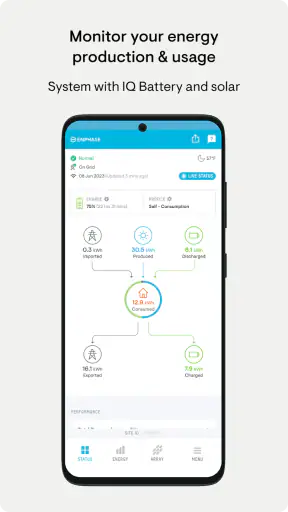
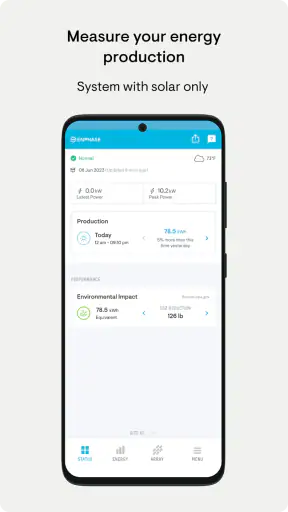
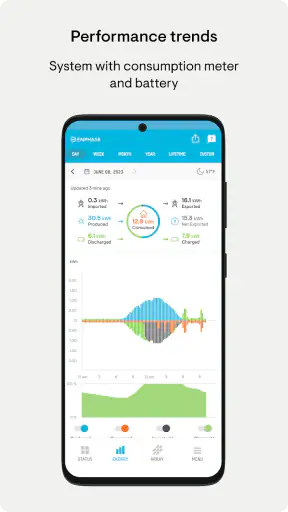
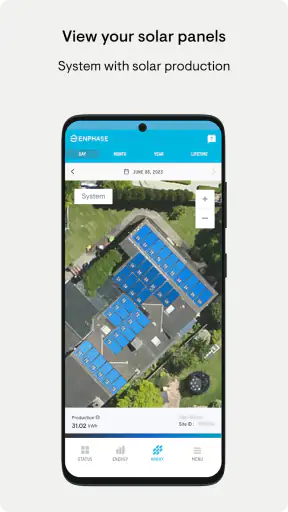
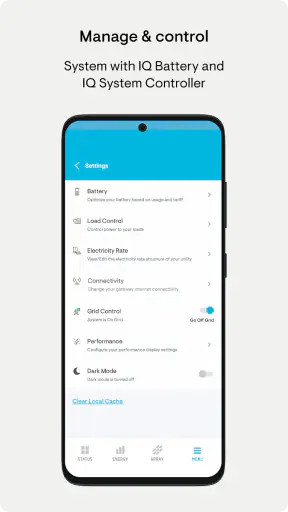
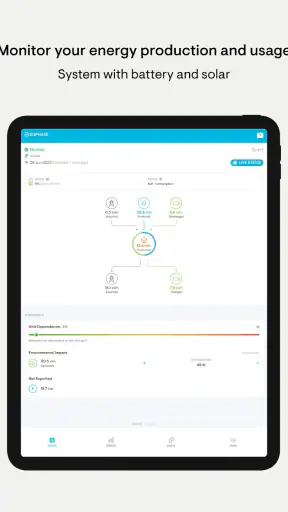
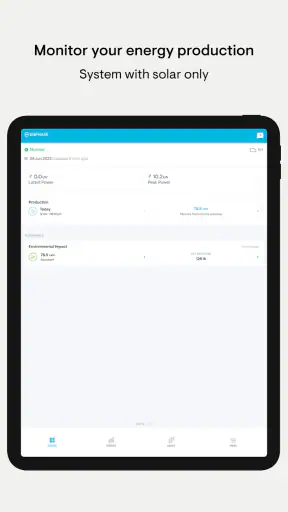
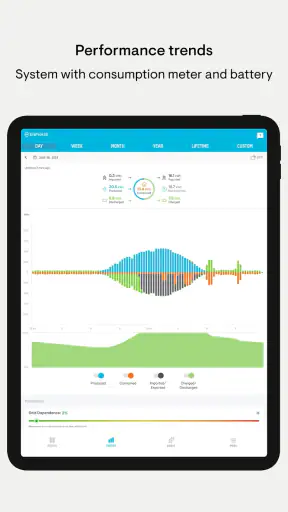
When I want to understand how a home solar installation is behaving without standing beside the equipment, I find Enphase Enlighten useful because it turns the system’s activity into something I can check from a phone. It is a free business app from Enphase Energy, aimed at people who already use an Enphase system and want a clearer view of its performance. My overall impression is practical rather than flashy: it works best as a monitoring companion, not as a complete energy-management solution.
The app has been available since January 10, 2014, and its long presence helps explain why it feels focused on a specific job. It is not trying to become a general finance, smart-home, or utility app. Its purpose is to help me follow the behavior of an Enphase installation, notice changes, and get a quick sense of whether the system is operating as expected. That narrow focus is also its biggest limitation, because the experience depends heavily on owning compatible Enphase equipment in the first place.
What using Enlighten feels like day to day
My first recommendation is to treat this app as a dashboard for decisions, not as entertainment. I would open it in the morning to see how the system is starting, check it around midday when solar production should be more active, and look again in the evening to understand the day’s result. That habit is more useful than repeatedly refreshing the screen, especially because solar output naturally changes with daylight and weather.
The app’s store rating sits at 3.7 from around 30 thousand ratings, which gives a reasonably balanced picture: many users find value in the monitoring, while the experience is not universally smooth. I would not read that score as a judgment on the solar hardware itself. It reflects the phone app, its connection to the installation, and the expectations users bring to remote monitoring.
Enphase Energy has placed the app in the business category, although I think that label can sound more formal than the real use case. A homeowner can use it just as naturally as an installer or property manager. The important distinction is whether the person needs visibility into an Enphase system. Without that connection, the app has little reason to remain installed.
Speed expectations: useful when you need a quick check
For ordinary checks, I value an app that gets out of the way. Enlighten is most convincing when I open it with a simple question: is the system producing, how has the day gone, or does something look different from normal? That kind of visit should feel brief. I do not need a complicated report every time I check the phone, and the app’s focused purpose makes short sessions feel more natural than long browsing sessions.
Still, I would avoid expecting instant answers in every situation. A monitoring app depends on communication between the phone, online services, and the solar installation. If one part of that chain is slow, the screen may not immediately represent what is happening at the panels. A delayed display is not automatically a hardware failure, and this is one of the first distinctions a new user should learn.
My practical advice is to compare patterns rather than react to one slow refresh. If the app takes longer than usual once, close it and try again later. If the same problem continues while the system’s normal behavior also appears unusual, then the information becomes more meaningful. That approach prevents a momentary connection delay from turning into an unnecessary service call.
The current release is version 4.7.0, and the app supports devices running Android 6.0 or later. That minimum is helpful for people using older Android phones, but compatibility alone does not guarantee a comfortable experience. A phone with limited memory, an aging battery, or a heavily cluttered system may make any dashboard feel less responsive. I would keep the operating system updated where possible and avoid judging the app only on a device that struggles with other applications too.
Heavy-use moments: where expectations need to stay realistic
Solar monitoring becomes more demanding during the moments when I care most: bright midday production, a sudden change in weather, or a day when the output looks different from the usual pattern. Those are also the moments when many users open the app repeatedly. Enlighten is useful for observing those changes, but repeated manual checking does not necessarily produce better information. A system’s daily curve is more informative than a series of screenshots taken minutes apart.
A realistic scenario would be a homeowner leaving for work on a cloudy morning. Before leaving, I might check whether production has begun. Around lunch, I could look again and notice that the day is progressing more slowly than expected. Instead of concluding that the equipment has stopped, I would compare the result with the weather and with the general pattern from previous days. In the evening, the accumulated view is more useful for deciding whether the difference was simply caused by conditions or deserves attention.
This is where the app can save time, but it can also encourage overinterpretation. A lower result is not automatically a fault, and a normal-looking screen is not a substitute for professional diagnosis when there is a serious equipment concern. I see Enlighten as an early-warning and awareness tool. It helps me identify something worth investigating; it does not turn me into a solar technician.
Another useful workflow is to use the app before contacting support or an installer. I would note when the unusual behavior began, whether it continues across more than one check, and whether the pattern is limited to a particular part of the day. That gives the conversation more context than saying only that the app “looks wrong.” The app’s value here is not just the display itself, but the way it helps me describe what I am seeing.
Reliability: separate the system from the screen
Reliability is the area where I would be most careful with expectations. A monitoring application can appear unreliable for several different reasons: the phone may have a weak connection, the remote service may be slow, or the installation may not be communicating normally. From the user’s point of view, all three can look similar at first. Enlighten makes the system easier to observe, but it cannot remove the uncertainty that comes with remote monitoring.
I prefer to judge it by consistency over time. If the app generally gives me a coherent view and occasional delays resolve themselves, I consider that manageable friction. If the displayed information repeatedly conflicts with what I know about the system, or if access fails during every important check, then the app stops being dependable for my needs. In that situation, I would investigate the connection and installation rather than immediately assume the phone software is the only problem.
The app has more than one million installs, so it is clearly used beyond a tiny group of early adopters. That does not guarantee identical performance for everyone. Solar installations differ, phones differ, and network conditions differ. I would therefore pay attention to my own pattern of use instead of assuming that another person’s experience will precisely match mine.
One habit improves confidence: check the app at consistent points in the day. A morning check, a midday check, and an evening check create a small personal baseline. I can then recognize genuine changes more easily than if I open the app at random times. This is a simple technique, but it makes the monitoring information more useful and reduces the temptation to treat every variation as a warning.
Device constraints and the people who should skip it
Because Enlighten is free and rated for Everyone, it is approachable for households where several people may need to view the system. The age rating removes one common barrier, but the more important constraint is technical: the app is only worthwhile when the property uses an Enphase system. Someone comparing solar providers before installation should not download it expecting a general calculator or a universal monitor.
I would also hesitate to recommend it as the only tool for a professional who needs broad fleet management, detailed operational analysis, or equipment controls beyond monitoring. The app’s focused role suits a homeowner who wants visibility, but a specialist workflow may require tools designed for deeper technical work. A utility’s own application may also be better for billing, account balances, or grid-specific information, since those are different responsibilities from watching an Enphase installation.
Older Android support is a practical advantage, yet the phone itself still matters. On a device close to its limits, I would expect slower launches or more frequent reloads than on a newer phone, even when the operating system meets the minimum requirement. I would also leave enough free storage and close unusually demanding background tasks before deciding that the app is inherently heavy. Those steps do not change the app’s design, but they make the test fairer.
For iPhone users, the key question is not whether the app looks attractive in isolation. It is whether the current experience on their particular device makes routine monitoring comfortable. I would install it only if I expect to use that visibility. If I rarely check production and already rely on another household member or an installer, the extra app may add little value.
How it compares with ordinary alternatives
The most obvious alternative is the utility app. That option is usually the better place to understand billing, usage charges, account notices, and grid transactions. Enlighten serves a different purpose: it gives me a view tied to the Enphase installation. If I want to know why a bill changed, I would start with the utility. If I want to understand whether my solar system is behaving differently from its normal pattern, I would start with Enlighten.
A second alternative is checking the equipment only through a web browser or asking an installer for updates. Those methods can work, but they are less convenient for a quick household check. The mobile app makes the information easier to reach during the day, which is especially helpful when I am away from home. The trade-off is that the phone experience may feel less suitable for extended analysis than a larger screen.
There is also the temptation to compare it with a general smart-home dashboard. I would not make that comparison too literally. A broad dashboard may bring lighting, thermostats, and energy devices into one place, but it can also hide the details that matter for a specific Enphase installation. Enlighten’s advantage is focus; the general dashboard’s advantage is consolidation. The better choice depends on whether I value system-specific visibility or one combined household screen.
Another trade-off concerns simplicity versus interpretation. A focused monitoring app can help me answer “what is happening?” quickly, while a more advanced energy platform may help answer “why did this happen?” in greater depth. I would choose Enlighten for regular awareness and basic investigation, not because I expect it to replace every other energy tool.
Three practical habits that make the app more useful
First, establish a baseline before looking for problems. I would observe several ordinary days and learn how the system typically looks in the morning, around the middle of the day, and after sunset. This gives later checks context. Without a baseline, even normal seasonal or weather-related variation can feel alarming.
Second, use the app to record a timeline when something changes. I would write down the first unusual check, the conditions at the time, and whether the next check returns to normal. That small record can help distinguish a temporary display issue from a recurring system pattern. It also makes any conversation with support more efficient because I can describe events in order.
Third, avoid treating frequent refreshing as a performance test. Reopening the app many times in a short period mainly tests the communication path, not the quality of the solar generation. I get better information by spacing checks across meaningful parts of the day. This is a subtle but important trade-off: less screen time can produce a clearer understanding.
A fourth habit is to separate observation from action. I might notice a low result, wait for another meaningful check, and then decide whether the pattern deserves attention. That does not mean ignoring a clear warning or a serious outage. It means using the app as evidence rather than allowing one ambiguous screen to dictate the response.
Who will get the most from it
I think the strongest audience is an Enphase homeowner who wants reassurance without becoming deeply technical. The app gives that person a convenient way to stay connected with the installation and notice changes while traveling, working, or simply moving around the house. It is also useful for households where one person handles the practical side of the solar system and wants an easy view that can be shared with others.
Property managers and small businesses may appreciate the same visibility, particularly when visiting the site is inconvenient. However, I would still define the app’s role carefully. It is a monitoring aid, not a replacement for maintenance planning, professional inspection, utility communication, or a detailed financial review.
I would skip it if I do not own or manage an Enphase installation, if I need a universal solar monitor, or if my main goal is bill analysis. I would also look elsewhere if I expect extensive controls, advanced reporting, or a single application that combines every energy device in the property. Those are reasonable requirements, but they go beyond the focused job this app performs.
My performance verdict
After weighing speed, heavy-use behavior, reliability, and device constraints, I see Enphase Enlighten as a useful companion with sensible boundaries. Its best quality is that it gives Enphase users a direct way to stay aware of their system without depending on a browser or waiting for someone else to check it. Its weakest point is the uncertainty that can arise when a delayed or incomplete display is mistaken for a hardware problem.
The app is free, supports Android 6.0 and later, and has an Everyone content rating, so the entry barrier is low. I would install it when I want routine visibility into an Enphase system and am willing to interpret the information with some patience. I would not install it expecting a universal energy dashboard or a professional diagnostic suite.
My final recommendation is straightforward: use it as a calm, regular monitoring tool, not as an alarm panel. Check meaningful patterns, give occasional delays a chance to resolve, and use repeated evidence before escalating a concern. With that mindset, Enphase Enlighten earns its place on the phone of an Enphase owner. It is not perfect, but it is specific, accessible, and most valuable when I need a quick connection to what the installation is doing.


